JIT compiler for AI agents/ open source · MCP · Apache-2.0
Your agentthinks once.Hotpath runs itforever.
Record an AI agent's tool calls once, drop its mistakes, and replay the task as a workflow that calls AI only where judgment is needed. On our demo tasks: 3–5× faster, ~10× cheaper.
git clone https://github.com/mourad-baazi/hotpath && cd hotpath && pnpm installnpm package soon · Node 22+ · Windows, macOS, Linux
- calls → steps
- 8 → 5
- mistakes dropped
- 4
- replay on new data
- ~0.5 s
- cheap AI call
- 1
01 · How it works
Like a JIT compiler, for agent tasks.
A JIT compiler finds the code that runs most often, the hot path, and compiles it. Hotpath does that for the tasks your agent repeats every day.
- 01
Record
Hotpath sits between your agent and its MCP server as a proxy. Do the task once, the way you already do; every tool call lands in a trace.
$ hotpath wrap claude-code my-server --task briefwrapped “my-server”: records task “brief” - 02
Compile
Failed and retried calls are dropped. Your inputs become {{inputs}}, values passed between tools become references, written text becomes one AI step, repeats over a list become a loop.
$ hotpath compile briefcompiled 5 steps (dropped 4 failed/retried calls) - 03
Run
Tool steps run as plain code. Only the judgment step calls a cheap model. Guards check every result; on drift it falls back to your agent and recompiles.
$ hotpath run brief --input date=2026-10-02✓ brief in 0.5s, $0.0009 (1 llm call)
02 · What compile keeps
It keeps what worked. It drops the rest.
Agents fumble: a wrong date, a missing argument, a retry. Hotpath reads the whole trace, throws away every failed call, turns your inputs into variables and the text the agent wrote into a single AI step.
- tool step = plain code
- AI step = cheap model
- ⚡ side effect
- ✗ dropped
- get_emailsdate: "today"error: invalid date
- get_emailsdate: "2026-10-01"date: {{inputs.date}}
- get_calendar{}error: date is required
- get_calendardate: "2026-10-01"date: {{inputs.date}}
- get_weathercity: "paris, fr"error: unknown city
- get_weathercity: "Paris", date: "2026-10-01"city: "Paris", date: {{inputs.date}}
- AI stepcheap model writes the brief from s1–s3
- send_messageto: "Me"error: unknown recipient
- send_messageto: "me", text: "Good morning! 3 emails…"to: "me", text: {{steps.s4.output}}⚡
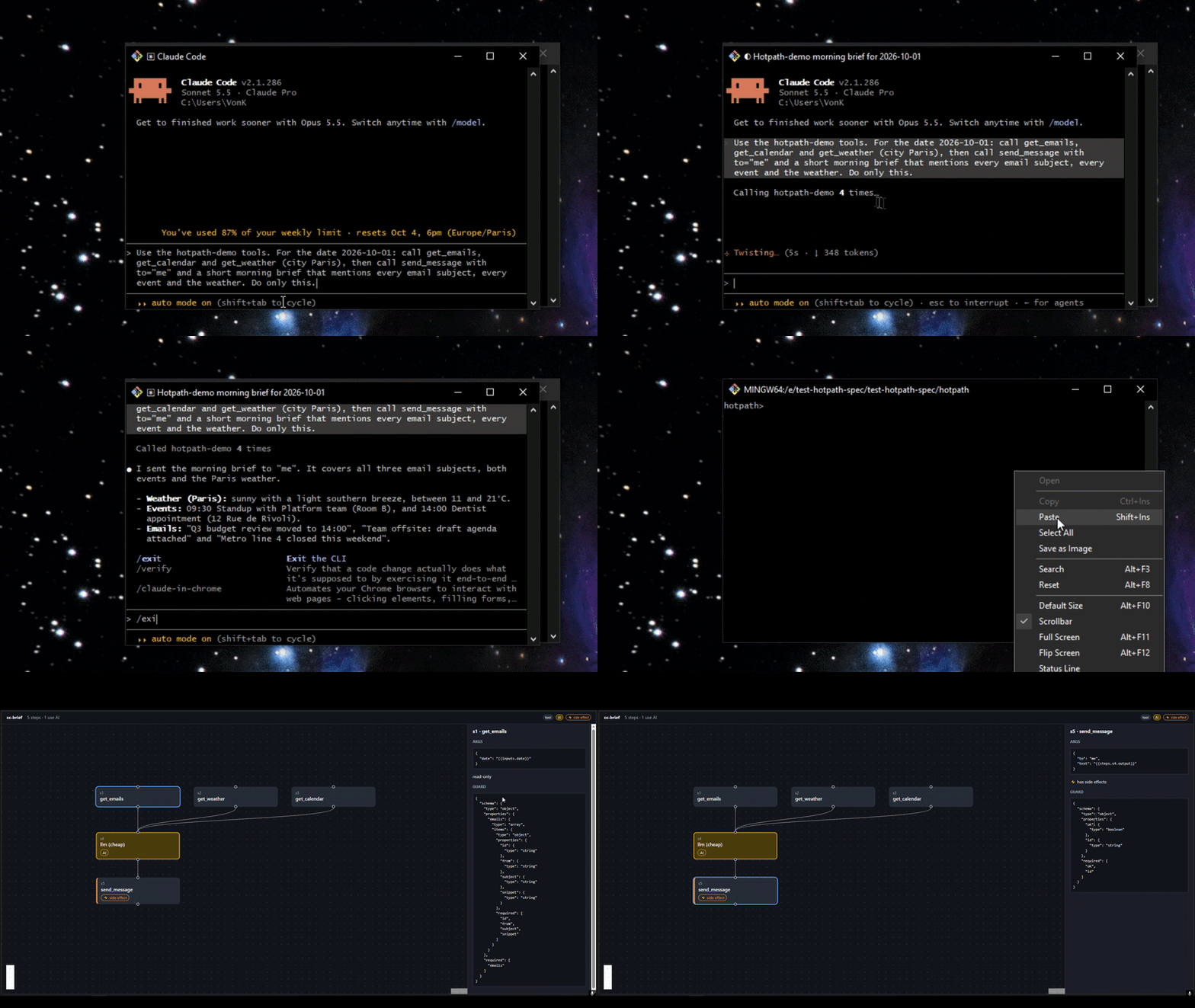
Illustration of a real recording: Claude Code did the task once with 4 failed calls.
03 · Proof
Recorded Claude Code once. Replayed it on new data.
A real run, not a mockup: Claude Code did a morning brief through Hotpath, made 4 mistakes on the way, and Hotpath kept the 5 steps that mattered. Then the benchmark, agent vs. workflow:
morning-brief · same data
4×
faster · 10× cheaper
morning-brief · new data
3×
faster · 10× cheaper
weekly-report · same data
4×
faster · 13× cheaper
weekly-report · new data
5×
faster · 12× cheaper
Small demo tasks on Groq, one run each, rate-limit waits excluded, costs from placeholder per-token prices. Full results and limits →
Works with Claude Code, OpenClaw, any stdio MCP server and your own agent.
04 · Features
Almost everything is plain code. One step is AI.
- 01
Drops the agent's mistakes
Wrong arguments, retries and errors stay in the trace and out of the workflow, so a replay never repeats them.
- 02
AI only where judgment is needed
Fetching and sending run as code. A cheap model writes only the parts that need words, grounded in this run's data.
get_emailsget_calendarget_weatherAI · write the briefsend_message ⚡ - 03
Self-heals on drift
Every result is checked against what was recorded. If a tool changes, Hotpath runs your agent once and recompiles, never after a side effect.
- 04
Runs on a schedule
Cron schedules with @today-style inputs. Safe by default: side effects stay dry-run and the agent isn't started until you allow it.
- 05
Loops over lists
“For each email, open it” compiles into a loop, so the workflow still works when tomorrow's list is longer.
- 06
Plain files, local-first
Traces, workflows and run history are JSON in your folder. Read them, edit them, commit them. Apache-2.0.
workflows/brief.json
{ "id": "s2", "type": "foreach", "as": "email",
  "over": "{{steps.s1.result.emails}}", "maxItems": 50,
  "body": [{ "id": "s2.1", "type": "tool", "tool": "get_email",
             "args": { "id": "{{email.id}}" }, "sideEffect": false }] }
05 · Honest limits
Questions, answered straight.
Hotpath is early and says so. Here is what it does, and doesn't do, today.
01Is Hotpath another agent?
No. Your agent (Claude Code, OpenClaw, your own) stays the brain: it figures a task out the first time. Hotpath is the muscle memory: it replays what worked, fast and cheap, and calls the agent back when something changes.
02Which tasks can it compile?
Sequences of tool calls, data passed between them, written text, and loops over a list, through stdio MCP servers. Tasks that branch (if this, do that) aren't compiled yet; they keep running through your agent.
03What happens when a tool or its data changes?
Each step has a guard (the result's shape, and for AI steps the facts the text must mention). A failed guard is drift: Hotpath falls back to your agent for that run and recompiles. If a side effect already ran, it stops instead, so nothing is sent twice.
04Where does my data go?
Nowhere new. Traces, workflows and run history are files in your project folder. AI steps call the OpenAI-compatible provider you configure (Groq, OpenAI, Moonshot, NVIDIA…), and nothing else.
05How mature is it?
Early. The record → compile → run loop, drift fallback, schedules and loops work and are tested; the benchmark covers small demo tasks with a single run each. Read the limits in BENCHMARK.md before relying on the numbers.
06What does it cost?
The CLI is free and open source (Apache-2.0). You pay your model provider for the one cheap AI call per run. Hotpath Cloud, for running tasks without your laptop, will be a paid option.
Hotpath Cloud · coming later
Runs 24/7 without your laptop.
The open-source CLI stays free. Cloud is for when your workflows should keep running while you sleep.
- Your schedules run 24/7, laptop closed
- Runs, costs and savings at a glance
- Alerts on drift and failures, where your team is
- Share workflows with your team
Rather follow along on GitHub? Star the repo and watch releases.